← Back to all work
Case Study

Designing an RFQ Module for Procurement

Turning a manual quotation process into a structured ERP workflow

RoleEnd to End Research & Designer
Timeline8 weeks
TeamProduct Team
Year2025

This project focused on designing a Request for Quotation module for the procurement team. What started as a simple requirement to send RFQs evolved into a comprehensive procurement decision-making workflow.

Problem Statement

Procurement teams lacked a centralized way to manage RFQs, compare vendor quotations, and explain vendor selection decisions. The existing process was spread across spreadsheets, emails, and calls, creating manual effort, hidden costs, poor traceability, and limited visibility for leadership.

Research

User Personas

Based on stakeholder interviews, I identified two primary user types with distinct needs and goals.

I need to see the complete picture – not just price, but shipping, quality, and delivery time – all in one place.
Priya Sharma
Procurement Team
Primary User
Background
5+ years in procurement, manages vendor relationships and RFQ processes daily. Handles 20-30 RFQs per month across multiple product categories.
Goals
  • Quickly compare multiple vendor quotations
  • Find the best total value, not just lowest price
  • Reduce manual data entry and spreadsheet work
  • Make confident vendor recommendations
Pain Points
  • Spends 3-4 hours per RFQ on manual comparison
  • Difficult to track vendor response status
  • Hard to justify vendor selections to leadership
  • Misses hidden costs like shipping and lead time
Typical Workflow

Send RFQs

Create and send RFQs to multiple vendors

Collect Responses

Track responses and follow up with vendors

Compare

Compare price, shipping, lead time and quality

Make Decision

Recommend best option and justify to leadership

I need confidence that we’re selecting vendors based on complete analysis, not just the cheapest option.
Rajesh Kumar
Procurement Head
Secondary User
Background
15+ years in procurement leadership, responsible for final vendor approvals and strategic sourcing decisions. Reviews 50+ vendor selections monthly.
Goals
  • Quickly understand vendor recommendation rationale
  • See all evaluated options, not just shortlisted ones
  • Ensure decisions consider total value
  • Maintain audit trail for compliance
Pain Points
  • Lacks visibility into full vendor comparison
  • Can’t see why certain vendors were excluded
  • Difficult to validate procurement decisions
  • No clear audit trail for vendor selection
Typical Workflow

Review

Review vendor recommendations and summaries

View Options

See all evaluated vendors and comparison details

Approve

Validate rationale and approve vendor selection

Audit

Track decisions and maintain compliance records

The Challenge

The procurement team was using spreadsheets, emails, messaging apps, and calls to collect prices, negotiate terms, track responses, and prepare vendor comparisons. The system had no clear record of procurement decisions, making it difficult to explain vendor selections confidently.

  • Why was a vendor shortlisted?
  • Which vendors were compared?
  • What tradeoffs were considered?
  • How did shipping costs affect final decisions?
  • Was leadership seeing the full picture?

Design Goals

Based on research findings, I defined clear UX goals that would transform the procurement workflow.

Centralize RFQ Lifecycle

Move from scattered spreadsheets and messages into one unified ERP-based workflow

Standardize Collection

Enable vendors to submit details through structured forms for consistent data

Improve Comparison Quality

Support comparison of total procurement value, not just product price

Support All Users

Provide depth for procurement users and clarity for leadership

Reduce Manual Effort

Minimize repeated work and improve process traceability

Enable Transparency

Make procurement decisions visible, explainable, and defensible

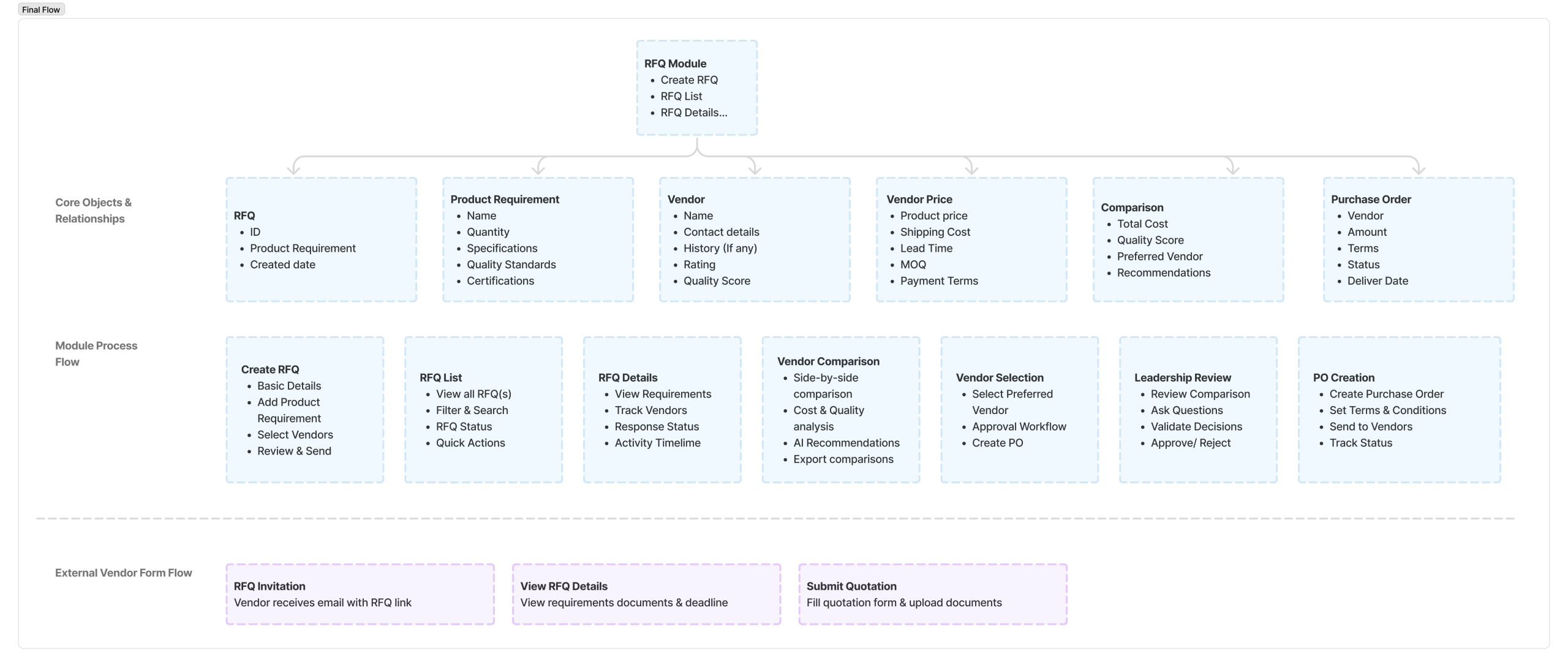
Process & System Architecture

Structured the RFQ module hierarchy to support the complete procurement workflow from creation to PO generation.
User Flow

Defined key user flows to ensure seamless navigation and task completion for both procurement users and vendors.

Flow 1: Create & Send RFQ

Key Decision Points:

  • Are all product requirements complete?
  • Have enough vendors been selected? (minimum 3 recommended)
  • Is the email template appropriate?

Flow 2: Vendor Quotation Submission

Design Consideration:

  • No login required – frictionless submission via email link
  • Clear validation for required fields
  • Ability to save and return later


Flow 3: Vendor Comparison & Selection

Key Features:

  • System suggests preferred vendor based on multiple criteria
  • Users can override recommendation with justification
  • Leadership can view full comparison before approval

Design Evolution

Iterated through multiple design versions, from low-fidelity wireframes to high-fidelity mockups.

Iteration 1
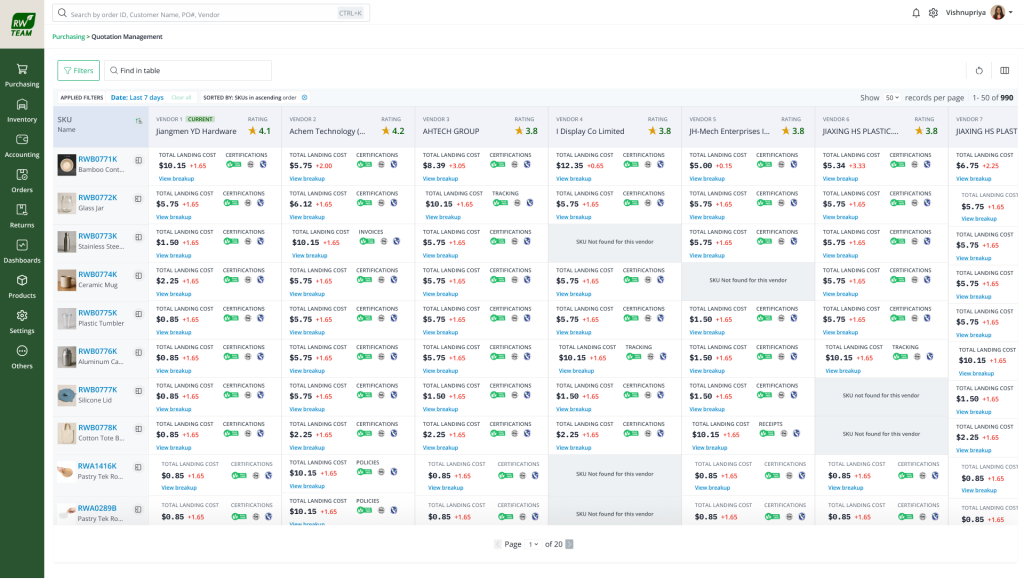
Feedback: 

  • Too much information displayed at once, causing cognitive overload.
  • Side-by-side vendor comparison is difficult due to excessive horizontal scanning.
  • Important insights like best vendor or recommended option are not visually highlighted.
  • Dense layout with small text and tight spacing reduces readability.
  • System presents raw data but lacks clear decision-support guidance for users.

Final Design

RFQ Creation Wizard

Step-by-step guided flow with clear progress indication. Users complete RFQ details, add products, specify requirements, and select vendors.

Key Features:

  • Progress indicator
  • Save as draft
  • Field validation
  • Review before send

Vendor Comparison Dashboard

Side-by-side vendor comparison with primary cost metrics visible at a glance. Expandable sections for detailed specs and history.

Key Features:

  • Sortable columns
  • Total cost calculation
  • Preferred vendor indicator
  • Quality scoring

Vendor Submission Form

Clean, minimal form for vendors to submit quotations via email link. No login required, mobile-responsive design.

Key Features:

  • Auto-save
  • Required field validation
  • File upload
  • Submission confirmation

RFQ Status Dashboard

Overview of all RFQs with status tracking. Quick filters for pending, responded, and closed RFQs.

Key Features:

  • Status filters
  • Quick actions
  • Search functionality
  • Response rate indicators

Impact & Results

The new RFQ module delivered measurable business impact and transformed procurement decision-making.

50%

Effort Reduction

Reduced RFQ processing and vendor comparison effort by half

(Based on Task analysis comparison)

70%

Centralized

All RFQ workflows moved from spreadsheets into unified ERP system

Eliminated Manual Data Entry

No more copying vendor quotes into spreadsheets

Improved Comparison Quality

Total procurement value beyond just product price

Enhanced Visibility

Leadership gained clear insight into vendor decisions

Faster Approvals

Structured data enabled quicker decision-making

Standardized Responses

Consistent vendor quotation format

Better Traceability

Complete audit trail of procurement decisions

Reduced Follow-ups

Clear status tracking eliminated manual checks

Decision Transparency

Explainable and defensible vendor selections
