Improving ERP search by letting people type how they think.
A filter-heavy lookup tool, used live during customer calls, was rebuilt around plain-English intent. Four to six steps collapsed into one — and the system finally started thinking in the user’s language.
Current reality
Search wasn’t a feature — it was a productivity tool used during live customer calls. Every extra click cost a customer’s patience, every retry cost an agent’s confidence.
Customer Support
Real-time order lookup during calls. Speed and partial info matter.
Operations
Filtering, monitoring, investigation across multiple modules
Workflow scenario
Support team handled customer issues in real time, and almost every conversation started with one thing: Finding the correct order.
The fastest path was through an Order ID, but customers often didn’t have it readily available during calls.
In those moments, Support team had to rely on fragmented information like:
Customer name
Phone number
Marketplace
Date of purchase
The problem wasn’t the lack of search capability. The problem was the amount of effort required to get to the right result.
A simple request like:
“I placed an Amazon order yesterday under Priya.”
The support team goes into a multi-step workflow:
- search with partial information
- scan through results repeatedly
The workflow technically worked, but it slowed users down during live conversations.
Which leads to
- High cognitive load — users translate intent into filters
- Search failures — partial info often = no result
- Inefficient flows — multiple retries, screen-switching
- Slow response — directly hurt customer experience
Problem
Support team need a faster and more intuitive way to find customer orders during live conversations because customers often provide incomplete or fragmented information instead of exact Order IDs.
Iteration 1
Added Filter Feature
When customers didn’t have an Order ID, support agents searched using available details like — Customer name Phone number Marketplace Purchase date. users applied filters step by step to narrow down results and identify the correct order.
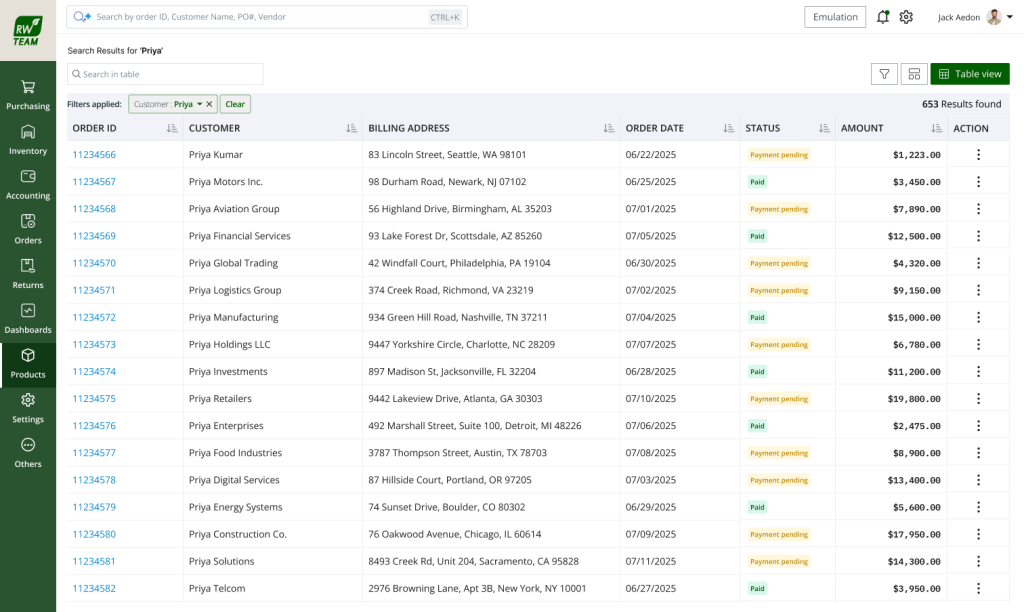
Why This Didn’t Fully Solve the Problem
- Filters Improved Search — But Didn’t Reduce Effort
Support agents still had to mentally map customer conversations into search fields and filter combinations while handling live calls. - The Workflow Was Still Multi-Step
Users continued switching between searching, filtering, scanning results, and retrying - Speed During Calls Was Still Affected
Every additional step increased response time and interrupted the natural flow of customer conversations.
Iteration 2
Improving Search Capability
To improve searches with incomplete or inaccurate information, we introduced fuzzy search capabilities.
This helped the system return approximate matches instead of relying only on exact values. For example:
- Minor spelling mistakes
- Partial customer names
- Incomplete phone numbers
could still return relevant results.
Why This Didn’t Fully Solve the Problem
- Reduced Search Failures — But Increased Result Noise
Fuzzy search returned broader matches, which often meant users had to scan through more results manually. - Cognitive Load Still Existed
Users still needed to evaluate whether the returned results were actually relevant during live customer conversations. - Workflow Was Still Manual
Users still searched, reviewed, retried, and refined results repeatedly. - Speed During Calls Was Still Impacted
Even though search became more tolerant, agents still spent valuable time validating results instead of resolving customer issues.
The current workflow requires agents to manually translate customer intent into searches, filters, and repeated result scanning, creating high cognitive load, slower response times, and inefficient support experiences that directly impact customer confidence and operational efficiency.
Key Insight
A search system that understands user input and applies filters automatically
During workflow observations, one pattern became clear, users were already describing searches naturally using human language, but the system required them to translate that intent into structured filters before it could respond.
“Users were already thinking in natural language. We didn’t introduce a new behaviour. We aligned the system to an existing mental model. — What guided every decision below
Orders from yesterday
Amazon Orders
Returns from last week
Solution
Quantifying what “inconsistent” actually meant.
Instead of adding more components, I separated concerns.
We inverted the model. Instead of the user picking a module and stacking filters, they state intent — and the system parses, decides, and applies.
Before
Search with order id → show all data’s, User applies filters → gets results
- Date = Yesterday
- Channel = Amazon
- Refine, retry…
After
Users express intent → System applies filters
Example: Show yesterdays orders from amazon
Orders
Amazon
Yesterday
Live Demo
Quantifying what “inconsistent” actually meant.
Query Model
Quantifying what “inconsistent” actually meant.
How a sentence becomes a structured query.
Input
“show me orders from yesterday from Amazon”
Step 01 · Entity
Order (Module Match)
Step 02 · Time
Yesterday (Date parse)
Step 03 · Attribute
Amazon (Sales channel match)
Interaction Design
Make the system’s understanding visible — and editable.
The fastest way to lose user trust is a black box that silently guesses. Filter chips solve this: they show what the system understood, and let the user fix it instantly — no restart, no lost context.
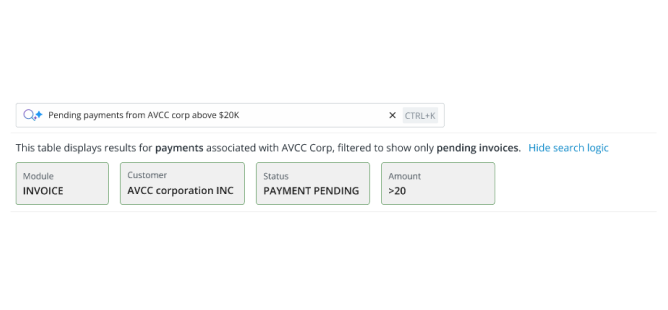
Transparent
Every parsed concept becomes a visible chip.
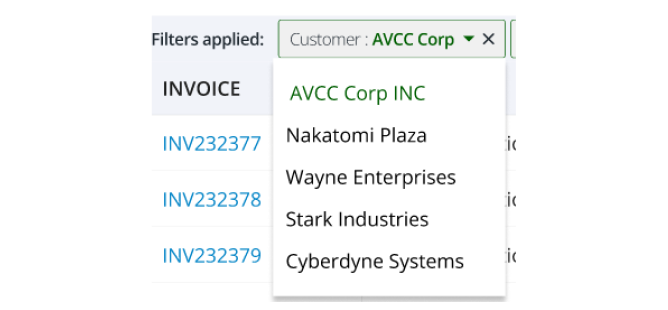
Editable
Each chip is removable and modifiable in place.
“Trust matters more than intelligence. Predictable beats clever.
Edge cases
Real users type messy things. The system was designed to fail softly, not silently — and to always offer a path forward.
Incomplete query
” orders yesterday “
Parses time. Channel/status omitted — broader result set, sorted by recency.
Incomplete query
” yesterday last week orders”
Last input wins. Chip shows resolved value; user can swap with one click.
Unsupported intent
” best performing vendors”
Falls back to keyword search + a hint surfacing supported query types.
Typos / partial words
” shopfy ordrs”
Fuzzy match within attribute dictionaries. Confidence drops → suggestion shown.
Adoption
ERP users resist change with good reason — their workflows are muscle memory. So we made the new behaviour discoverable, not mandatory.
01
02
03
04
Smart placeholder
Clickable example queries
Progressive exposure
Filters still work
“Try: orders from yesterday”
Surfaced in empty states & first-load
No forced onboarding tour
Old behaviour preserved as a power-user fallback
Trade offs
What we picked, what we left.
Transparency is more valuable than over-automation
Rule-based parsing was more valuable than full NLP
Letting users confirm/edit interpreted inputs is better
Users prefer systems that behave consistently and reliably
What we didn’t solve
- Full conversational search
- Analytical queries (sums, trends, top-N)
- Deep semantic understanding
What could break
Combinatorial explosion as attributes grow
Ambiguity at scale (overlapping vocabularies)
Maintenance overhead in dictionaries
Performance on very large result sets
We didn’t just improve search. We reduced the mental effort required to use it — by aligning the system with how users naturally think.