Eliminated Manual Data Entry
No more copying vendor quotes into spreadsheets
This project focused on designing a Request for Quotation module for the procurement team. What started as a simple requirement to send RFQs evolved into a comprehensive procurement decision-making workflow.
Procurement teams lacked a centralized way to manage RFQs, compare vendor quotations, and explain vendor selection decisions. The existing process was spread across spreadsheets, emails, and calls, creating manual effort, hidden costs, poor traceability, and limited visibility for leadership.
Based on stakeholder interviews, I identified two primary user types with distinct needs and goals.
Manages RFQs, vendor communication, and quotation comparisons. Handles multiple sourcing requests every month and needs faster vendor evaluation.
Create RFQ
Collect Quotes
Compare
Recommend
Reviews procurement recommendations and approves vendor selections. Requires transparency, auditability, and complete comparison data.
Review
Evaluate
Approve
Audit
The procurement team was using spreadsheets, emails, messaging apps, and calls to collect prices, negotiate terms, track responses, and prepare vendor comparisons. The system had no clear record of procurement decisions, making it difficult to explain vendor selections confidently.
Based on research findings, I defined clear UX goals that would transform the procurement workflow.
Move from scattered spreadsheets and messages into one unified ERP-based workflow
Enable vendors to submit details through structured forms for consistent data
Support comparison of total procurement value, not just product price
Provide depth for procurement users and clarity for leadership
Minimize repeated work and improve process traceability
Make procurement decisions visible, explainable, and defensible
Structured the RFQ module hierarchy to support the complete procurement workflow from creation to PO generation.
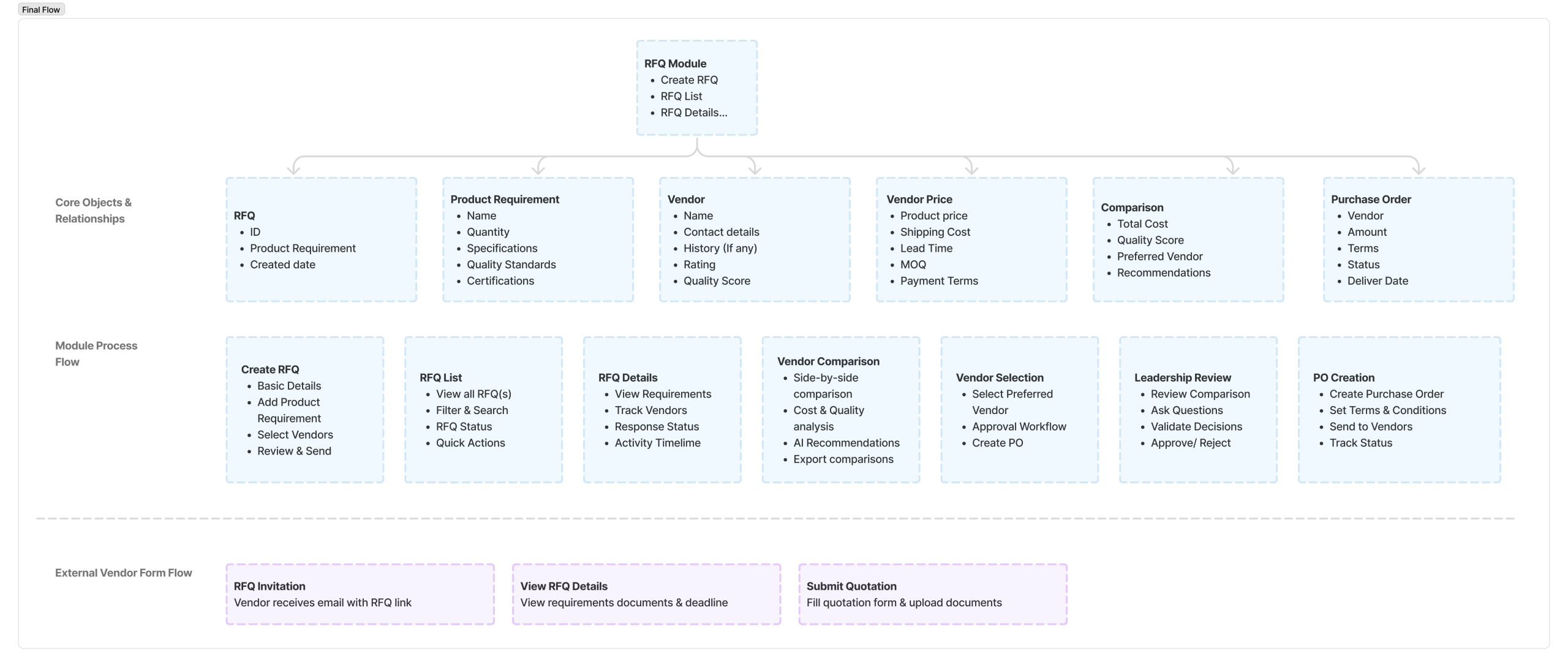
Defined key user flows to ensure seamless navigation and task completion for both procurement users and vendors.
Flow 1: Create & Send RFQ

Flow 2: Vendor Quotation Submission

Flow 3: Vendor Comparison & Selection

Iterated through multiple design versions, from low-fidelity wireframes to high-fidelity mockups.
Iteration 1
Step-by-step guided flow with clear progress indication. Users complete RFQ details, add products, specify requirements, and select vendors.
Key Features:
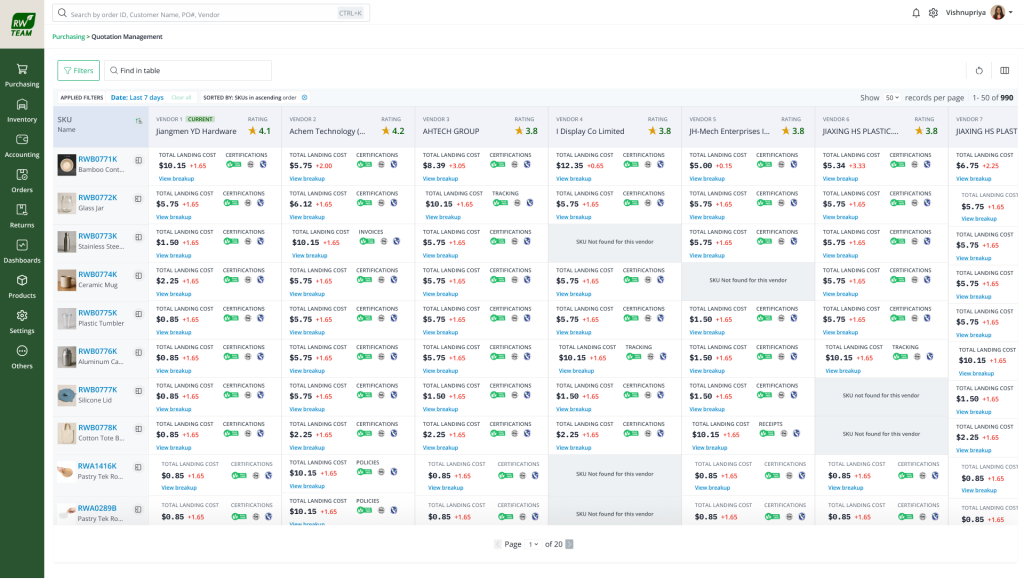
Side-by-side vendor comparison with primary cost metrics visible at a glance. Expandable sections for detailed specs and history.
Key Features:
Clean, minimal form for vendors to submit quotations via email link. No login required, mobile-responsive design.
Key Features:
Overview of all RFQs with status tracking. Quick filters for pending, responded, and closed RFQs.
Key Features:
The new RFQ module delivered measurable business impact and transformed procurement decision-making.
Reduced RFQ processing and vendor comparison effort by half
(Based on Task analysis comparison)
All RFQ workflows moved from spreadsheets into unified ERP system
No more copying vendor quotes into spreadsheets
Total procurement value beyond just product price
Leadership gained clear insight into vendor decisions
Structured data enabled quicker decision-making
Consistent vendor quotation format
Complete audit trail of procurement decisions
Clear status tracking eliminated manual checks
Explainable and defensible vendor selections